※This was translated into English using Google Translate. It may be difficult to read.
I cannot export videos using the “Speed Optimization” upscaling option in UniFab v4.0.3.0 and v4.0.4.0.
Video export gets stuck forever at the screenshot stage.(This issue did not occur in v4.0.0.0 or v4.0.2.0)
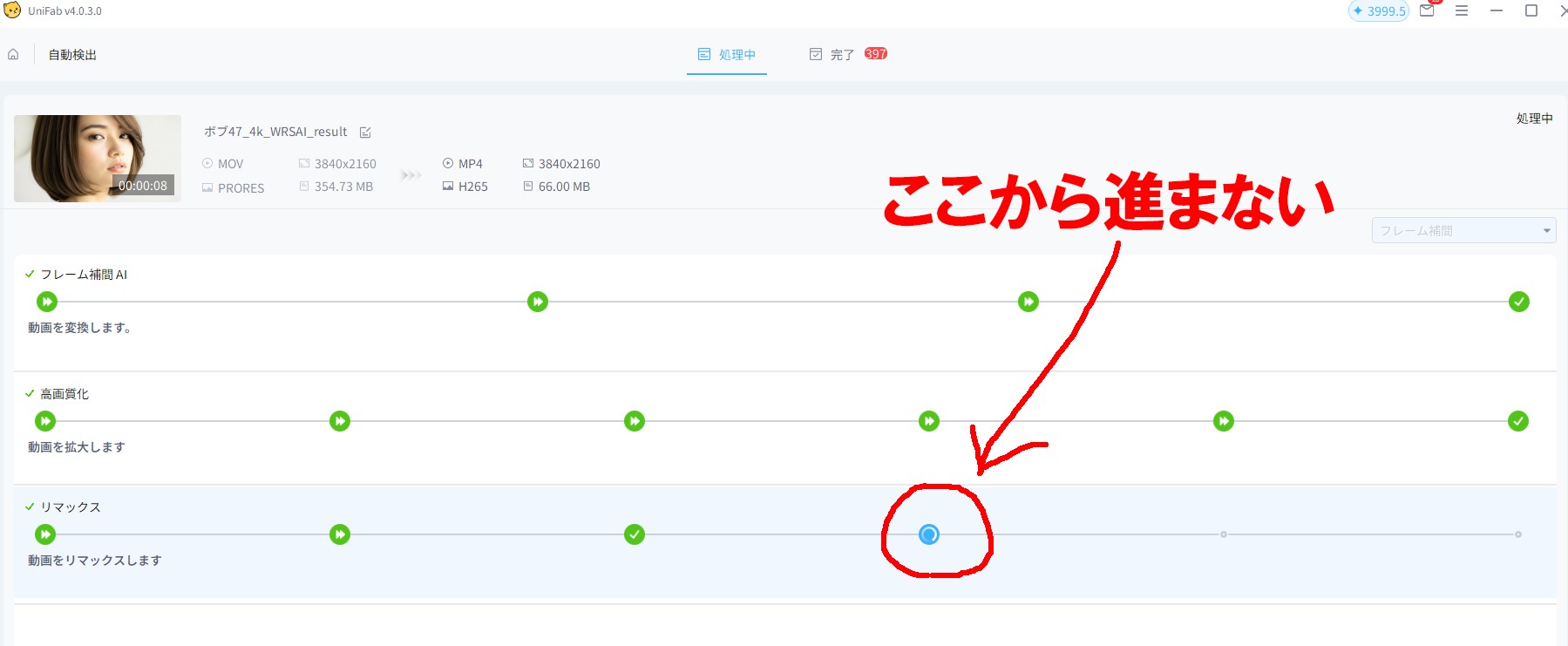
However, this issue does not occur when using “Quality Optimization”.
Even after all plugin and AI model installations finish in the background, exporting videos with Speed Optimization triggers the installations to restart endlessly.
Incidentally, when attempting to export a video using “Speed Optimization,” the process gets stuck indefinitely during the “Remax” stage of the export.
I have submitted feedback regarding this issue in UniFab v4.0.3.0 and v4.0.4.0, but it remains unresolved and neglected.
It is unusable for work and causing significant problems.
I deeply regret purchasing UniFab.
Attempted solutions:
Performed a clean install of the GPU RTX driver (Studio driver),
Completely uninstalled and reinstalled UniFab, but the problem persists. Tried repairing the Microsoft Visual C++ Redistributable Package, but it didn’t resolve it. Disabling security software also didn’t fix it.
Environment:
Intel® Core™ i7-9700K CPU @ 3.60GHz (3.60 GHz)
RAM: 48GB
NVIDIA GeForce RTX 2070 SUPER
UniFab Settings >
Conversion:
Unchecked: Enable B-frame conversion for NVIDIA Turing cards.
Unchecked: Automatically append interlaced video sources to the deinterlacer module.
GPU:
Checked: Enable CUDA/IQS/AMD hardware acceleration
AI Processor: NVIDIA GeForce RTX 2070 SUPER for maximum performance
(NVIDIA Studio driver version is the latest 591.74)